 passubly
Never uploaded.
It all happens on your phone.
Passwords and subscriptions, managed without ever uploading them to the cloud. Local-first, zero-knowledge design — unless you choose sync, your data never leaves your device.
iOS version coming soon
All features free for 14 days. No payment method required.
Where are your passwords right now?
Typical cloud-based storage
Stored on the service provider’s servers, beyond your device.
passubly
Never uploaded to a developer server. Stored on your device with AES-256 encryption.
If you choose iCloud sync, your data is encrypted on your device and stored, still encrypted, only in your own iCloud.
Never readable: zero-knowledge design means no one — including us — has any way to read your registered data.
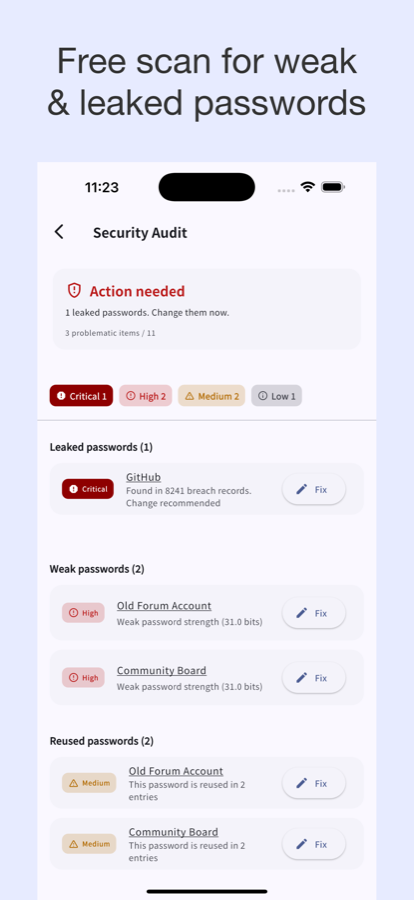
Stay safe — check your passwords
Leaked & weak passwords
A k-anonymity breach check finds leaked or weak passwords without ever sending your password itself.
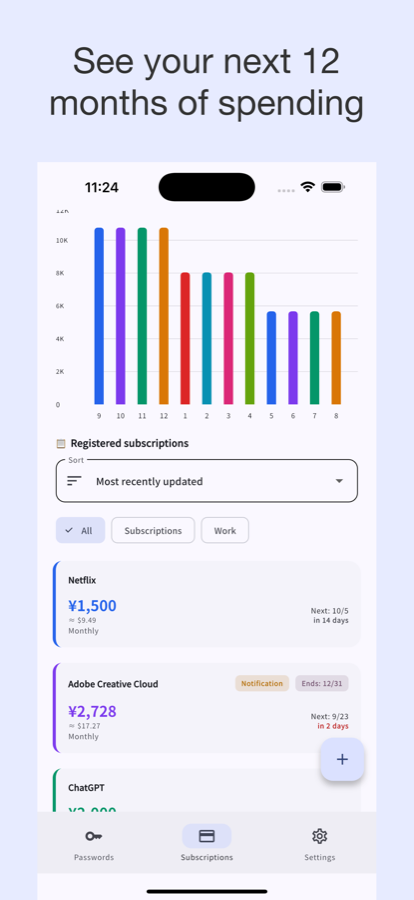
Save more — spot subscription waste
A pie chart and 12-month forecast make subscriptions you’re quietly overpaying for easy to spot. 20 currencies auto-converted.
per year
over 5 years
An estimate if your monthly total stays the same. The amount you enter is never sent.
Never locked in — easy to try, easy to leave
Come in
- No account registration
- No email required
- No payment method required
- Import from your current tool with CSV
Move on
- Export CSV to take your data to another tool (Premium; also available during the 14-day free period)
- Keep an encrypted backup of your data
All this, for free
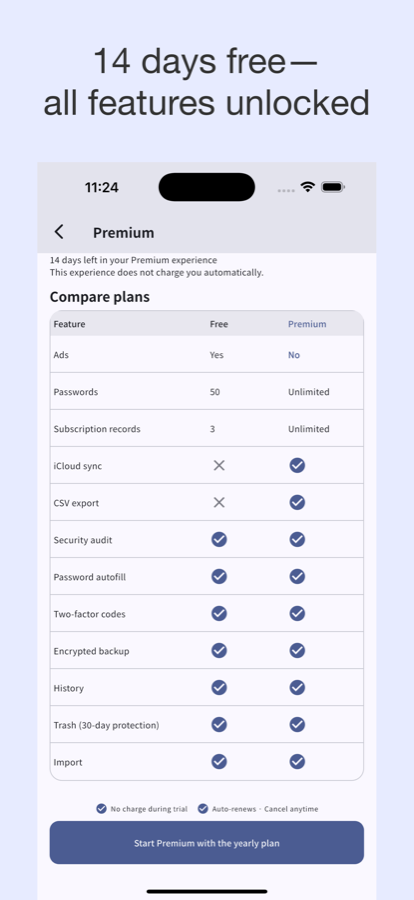
All features free for 14 days. No payment method, no automatic charge. Keep using the free plan after 14 days.
Free
With item limits and ads
- OS autofill
- TOTP two-factor codes
- Change history
- Restore from trash
- 20 currencies, 15 languages
- CSV import
- Encrypted backup
Premium
- Unlimited items
- No ads
- CSV export
- iCloud sync (iOS)
See the store for pricing
Exact pricing is shown on the App Store / Google Play listing.
FAQ
Do you really never send my data anywhere?
Correct. Your passwords and subscription entries are stored only on your device and never sent to a developer server. If you choose iCloud sync, they are stored, still encrypted, only in your own iCloud. See our Privacy Policy for details.
How do I move to a new phone?
Use an encrypted backup or CSV export (Premium) to migrate to a new device. Between iOS devices, iCloud sync (Premium) is also available. Steps are on the Support page.
What happens to my data if I cancel?
You can always view and delete your data in the app, even after canceling. Because data lives only on your device, no deletion request to us is needed.
Is sync available on Android?
Not currently — device-to-device sync is iOS-only (via iCloud). On Android, use encrypted backup instead.
Are there ads?
The free plan uses only non-personalized ads, without tracking via advertising identifiers (IDFA / AAID). Privacy Policy